Z-ORDER was a huge step forward for Delta Lake query performance — but it was never designed for the scale we’re running at today. Liquid Clustering is the replacement the Delta community has been waiting for. Here’s why we made the switch, and how you can too.
What Z-ORDER did well
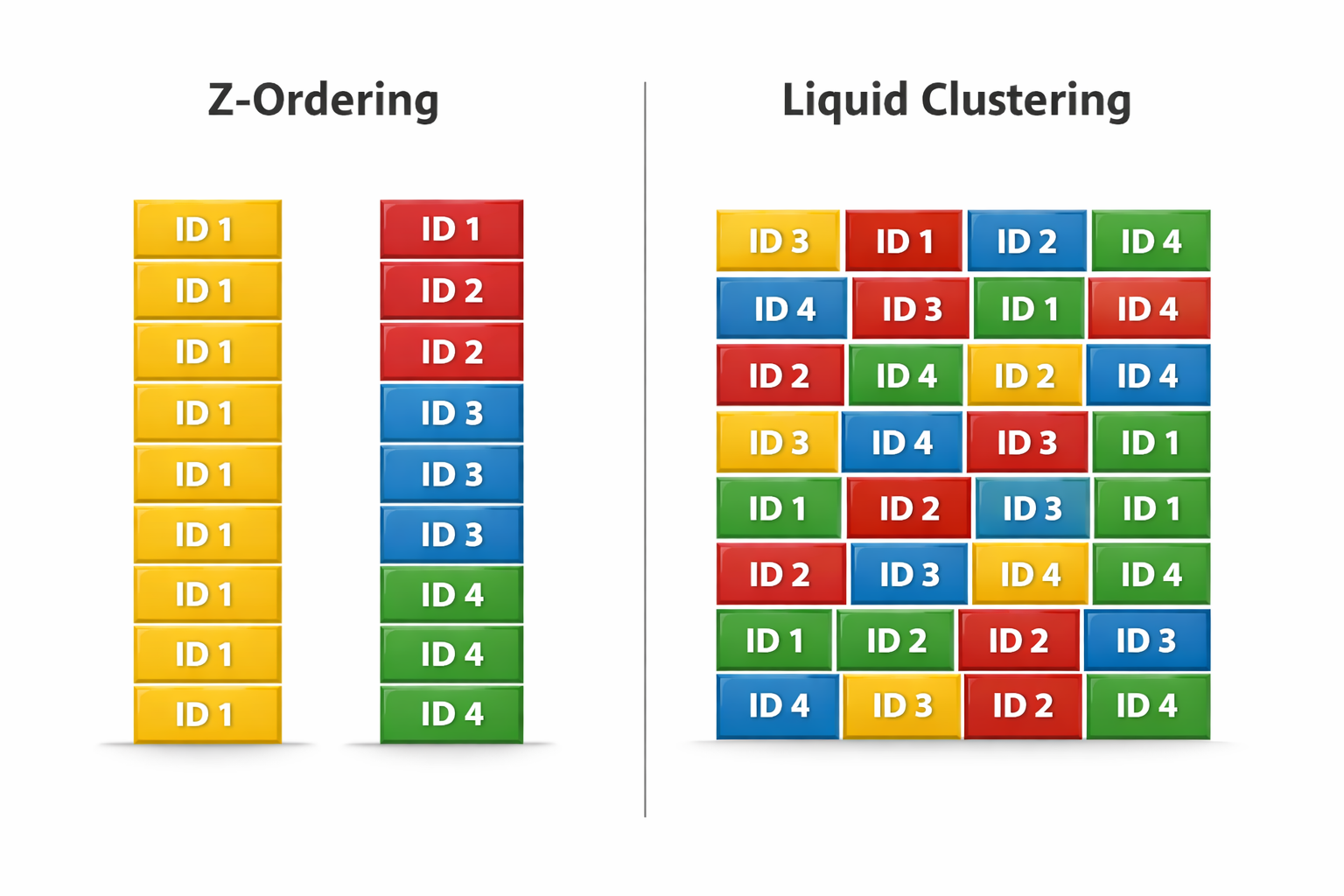
The official Delta Lake blog describes it well: Z-ORDER reorganizes data in storage so that similar data lives in the same files, which allows certain queries to skip more files and run faster. Unlike Hive-style partitioning — which creates one directory per distinct column value — Z-ORDER works within files, using a space-filling curve to co-locate rows that are close in multi-dimensional space.
This was genuinely useful. Before Z-ORDER, if you filtered by region and sale_date, Delta had no way to skip files without partitioning on both — which could explode into thousands of small files. Z-ORDER let you get meaningful file skipping on high-cardinality columns without paying the small-file penalty.
Z-ORDER continues to be supported,
Liquid Clustering provides flexibility to redefine clustering columns
without rewriting existing data, allowing data layout to evolve alongside analytic needs over time.
Even the Delta Lake team themselves are pointing you toward Liquid Clustering. That’s the signal we needed.
The problems we ran into at scale
Z-ORDER worked fine on smaller tables. As our tables grew past a few hundred GB — and our pipelines became more complex — the cracks started to show.
- Full table rewrite every time you run OPTIMIZE
- Needs manual scheduling — nothing automatic
- Locks writes during optimization
- Doesn’t scale well beyond 2 columns
- Clustering columns are fixed once set
- Needs re-running after major data updates
- Incremental — only touches new or changed data
- Can run automatically in the background
- Works smoothly with concurrent writes
- Handles multiple columns (up to 4) well
- You can change clustering columns anytime
- No need to rely on OPTIMIZE runs
Z-ORDER's OPTIMIZE … ZORDER BY command always rewrites the entire table — even if only 5% of the data changed. On a multi-TB table running on a daily schedule, this becomes one of the most expensive operations in your pipeline.
Z-ORDER: what it looks like
Here’s what the Z-ORDER setup typically looks like — notice we have to run OPTIMIZE separately, on a schedule, every time:
-- Z-ORDER setup
-- Step 1: Create the table (no clustering defined here)
CREATE TABLE sales (
  id        BIGINT,
  region    STRING,
  sale_date DATE,
  amount    DOUBLE
) USING DELTA;

-- Step 2: Manually run OPTIMIZE to apply Z-ORDER
-- Must be scheduled and re-run after every significant write
OPTIMIZE sales
ZORDER BY (region, sale_date);

-- Drawback: rewrites ALL files, every single time
-- Blocks writers, takes longer as table growsLiquid Clustering
Liquid Clustering, introduced in Databricks Runtime 13.3+, replaces Z-ORDER with an automatic, incremental approach. We define clustering columns once at table creation and Delta handles the rest.
Liquid Clustering monitors data access patterns and reorganizes data in the background, ensuring the most relevant data is co-located. This process is continuous and adapts to new data and changing query patterns.
Mainly used for?
- Tables often filtered by high cardinality columns.
- Tables with significant skew in data distribution.
- Tables that grow quickly and require maintenance and tuning effort.
- Tables with access patterns that change over time.
- Tables where a typical partition column could leave the table with too many or too few partitions.
Liquid Clustering in practice
Setting up Liquid Clustering is simpler — define CLUSTER BY at table creation. OPTIMIZE becomes optional, not mandatory:
-- Create new table with Liquid Clustering
-- Define clustering at creation time — that's it
CREATE TABLE sales (
  id        BIGINT,
  region    STRING,
  sale_date DATE,
  amount    DOUBLE
) USING DELTA
CLUSTER BY (region, sale_date);

-- Optional: trigger a clustering pass manually
-- Only processes new/changed files — not the whole table
OPTIMIZE sales;Migrate an existing Z-ORDER table
-- No data rewrite needed to define clustering
ALTER TABLE sales CLUSTER BY (region, sale_date);

-- Run OPTIMIZE once to apply clustering to existing files
OPTIMIZE sales;

-- After this, incremental clustering kicks in automaticallyChange cluster columns anytime (no rewrite required)
-- Business needs changed? No problem.
ALTER TABLE sales CLUSTER BY (region, amount);

-- Future writes will use the new clustering definition
-- Existing data is reclustered incrementally on next OPTIMIZEZ-ORDER vs Liquid Clustering – Why Liquid Clustering wins.
The biggest difference was files rewritten. Every Z-ORDER run rewrote the entire table — even data unchanged for weeks. Liquid Clustering only touches new or unclustered files. On a 2 TB table, that dropped a nightly OPTIMIZE job from 40 minutes to under 6.
How each approach organizes data under the hood.
When to still use Z-ORDER
Honestly? The main reason is compatibility. If your environment doesn’t support Liquid Clustering yet, Z-ORDER is still a solid tool — just use it carefully. Limit to 1–2 columns, scope your OPTIMIZE runs, and don’t treat it as a fire-and-forget scheduled job.
For everything else — new tables, evolving schemas, high-write pipelines, multi-column filter workloads — Liquid Clustering is the right answer. It’s not just a better Z-ORDER. It’s a fundamentally different model where the clustering contract lives on the table, not in your pipeline scripts.
DBR version (need 13.3+)② Ensure table is on
Unity Catalog③ Run
ALTER TABLE ... CLUSTER BY④ Run
OPTIMIZE once to seed the layout⑤ Remove the old scheduled
Z-ORDER job⑥ Optionally enable
Auto Compaction in Databricks settings
Conclusion
Z-ORDER served us well, but it was built for a simpler time. As tables grow and pipelines get busier, the cost of rewriting everything on every run adds up fast.
Liquid Clustering fixes the right things — it’s incremental, it’s automatic, and it gets out of your way. You define the layout once, and Delta handles the rest.
If you’re on Databricks Runtime 13.3 or higher, there’s no reason to wait. Run ALTER TABLE ... CLUSTER BY, kick off one OPTIMIZE, and remove that scheduled job from your pipeline. That’s the whole migration.
The data layout problem didn’t get harder — the tool just got better.
Leave a Reply